

Small delays can become a major operating cost
A slow computer, a document that needs to be entered twice, or a printer that interrupts a busy department can look like a minor inconvenience. Across your business, those interruptions add up.
If 30 employees each lose just 15 minutes per workday, that equals 1,875 staff hours over a 250-workday year. At an illustrative loaded labor cost of $30 per hour, that represents $56,250 of staff time.
That is an example, not a promise of recoverable savings. But it makes the business question concrete: how much time is your current technology consuming, and where would an improvement matter most?
A useful annual technology review looks beyond the age of individual devices. It examines how your IT, print equipment, documents, cloud tools, and communications work together.
1. Productivity & Workflow: remove the handoffs that slow people down
Your employees experience technology as a workflow, not a collection of separate products. A fast computer does little to help if the next step is printing a document, scanning it, searching for the file, and entering the same information again.
Consider what happens when a signed document arrives. Does someone scan it to an inbox, rename it, and manually move it into a shared folder? Could an appropriately configured scan-to-cloud workflow reduce those steps and make the document easier for authorized colleagues to find?
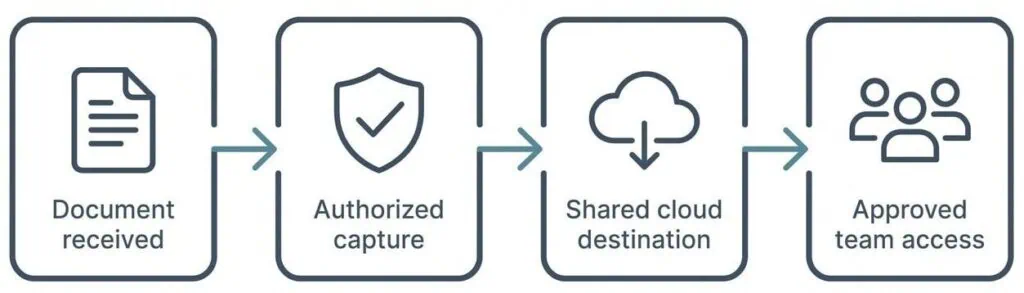
Review the connections between:
- Computers, network performance, and access to cloud applications.
- Multifunction printers, document capture, and shared storage.
- File permissions, document retrieval, and repetitive data entry.
- Business phone systems and the way employees communicate across locations.
The goal is not to replace everything. It is to identify the bottlenecks that affect daily work and make better use of capabilities you may already have.
2. Security & Business Continuity: include every connected endpoint
Your security review should not stop at employee computers. Network-connected multifunction printers can process and store sensitive documents. Unsupported firmware, weak access settings, and unmonitored devices can create exposure alongside risks in your network and cloud accounts.
Include print devices in the same conversation as account access, software updates, and recovery planning. Review who can administer them, how updates are handled, whether sensitive print jobs need secure release, and what happens to stored information when equipment is retired.
For your broader environment, examine multifactor authentication, account permissions, supported software, and tested backups. Cyber insurance applications and renewals may ask about these controls, but requirements vary by carrier and policy.
Discuss the operational impact of an outage, too. If employees cannot access customer records, documents, or business systems, how long can essential work continue? Who is responsible for restoring access, and when was the recovery process last tested?
Address those questions before an interruption makes them urgent.
3. Cost & Lifecycle Planning: connect the budget to the whole environment
Looking only at the purchase price of a device can hide its ongoing cost. Frequent service calls, supplies, duplicated software, and employee workarounds all deserve attention.
For print, review device utilization, service history, and cost-per-page reporting where available. A lightly used device and an overloaded departmental printer may point to a fleet-design issue rather than a need to buy more equipment.
For IT and software, compare active users with paid licenses, identify unsupported equipment, and review upcoming renewals. Separate changes that need attention now from upgrades that can be planned across future budget cycles.
A connected view helps prevent an isolated purchase from solving one problem while leaving the underlying workflow or security gap untouched.
Put an experienced local team behind the review
Sissine’s has served businesses since 1981, bringing together copy and print services, managed IT, network solutions, computer systems, and business communications.
That breadth matters when a challenge crosses categories. A document bottleneck may involve the printer, the network, the cloud destination, and the permissions governing access. Reviewing those pieces together creates a better starting point than treating each as an unrelated purchase.
Schedule your Business Technology Review before the next budget or renewal decision
Bring your current technology challenges, upcoming initiatives, and equipment or software questions to a Business Technology Review with your Sissine’s account team.
The review evaluates your current environment, identifies opportunities to improve efficiency and productivity, and connects recommendations to your goals and budget. Your team can also help you develop a technology roadmap for continued success.
To make the conversation productive, bring an equipment list, renewal dates, or examples of workflows that regularly slow your team down. Use the scheduling form to identify the areas you want to discuss, including managed IT, cybersecurity, print and document management, cloud solutions, or business communications.
Before another renewal or equipment purchase locks in the status quo, take a connected look at what your business needs next.